How to Setup IPTV Smarters on Fire TV Stick [2026] 🚀
Ready to turn your Fire TV Stick into a streaming powerhouse? You are in the right place! This guide will walk you through the simple steps to get IPTV Smarters Pro running on your device. It is easier than you think. Let’s get started! 😊
Step 1: Prepare Your Fire TV Stick ✅
First, grab your Fire TV Stick remote. Make sure your device is connected to the internet. Go to the home screen and find the Settings menu.
- Select My Fire TV.
- Choose Developer Options.
- Turn ON Apps from Unknown Sources. This lets you install apps from outside the Amazon Appstore.
💡 Tip Do not worry, this is safe. You are just allowing one trusted app.
Step 2: Install the Downloader App 📥
You need a helper app to get IPTV Smarters. Use the search function on your Fire TV home screen.
- Search for “Downloader”.
- Install the free Downloader app by AFTVnews.
- Open the Downloader app once it is installed.
Step 3: Download & Install IPTV Smarters Pro 🔧
Now for the main event! Inside the Downloader app:
- In the URL field, enter this official link: https://iptv-smarterspro.org/
- Press Go. The website will load.
- Look for the download link for the Fire TV/Android TV version.
- Download and install the app. It only takes a minute!
Step 4: Log In and Start Streaming 🎬
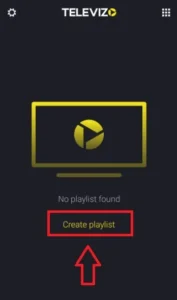
Find IPTV Smarters Pro in your app list and open it. You will see a login screen.
- You need your service details from your provider. This usually includes a URL, username, and password.
- Enter the details carefully.
- Once logged in, your live TV, movies, and series will load. Enjoy!
Why You Will Love IPTV Smarters on Fire TV 🏆
Smooth & Easy Interface 👍
The app is designed for your TV. Big buttons, clear menus, and simple navigation make finding your favorite shows a breeze.
All Your Content in One Place 📺
Watch live TV, thousands of on-demand movies, and full series seasons. It organizes everything into neat categories like Sports and Kids.
Works Great on Fire TV ⚡
The app is optimized for Amazon’s device. You get fast loading times and stable streams, even on older Fire TV Stick models.
Quick Fixes for Common Problems 🛠️
App Won’t Install or Open?
Check this: Go back to Settings > My Fire TV > Developer Options. Make sure “Apps from Unknown Sources” is still ON. Sometimes updates turn it off.
Buffering or Freezing Streams?
Try this: Restart your Fire TV Stick and your internet router. Also, check your internet speed. A wired Ethernet connection (with an adapter) is more stable than Wi-Fi for streaming.
Login Details Not Working?
Do this: Double-check the URL, username, and password from your service provider. One small typo can cause a login failure. Contact your provider if you are sure the details are correct.
Ready for the Best Streaming Experience? 🚀
IPTV Smarters Pro turns your Fire TV Stick into an entertainment center. It is the perfect app for watching live TV and on-demand content.
Follow the simple steps above and start watching in minutes!